Marley Health - Medication Alerts
Introduced in Version 16
Marley Health checks every medication order against the patient's recorded allergies and the drug interaction rules your site maintains. Alerts are raised while prescribing, in Patient Encounter and Medication Request, so a contraindicated combination is caught before the order is placed rather than at dispensing.
Medication alerts are switched off on a new site. Turn them on once you have reviewed the interaction rules your site will use.
Enabling medication alerts
Navigate to Healthcare Settings > Medication Alerts.
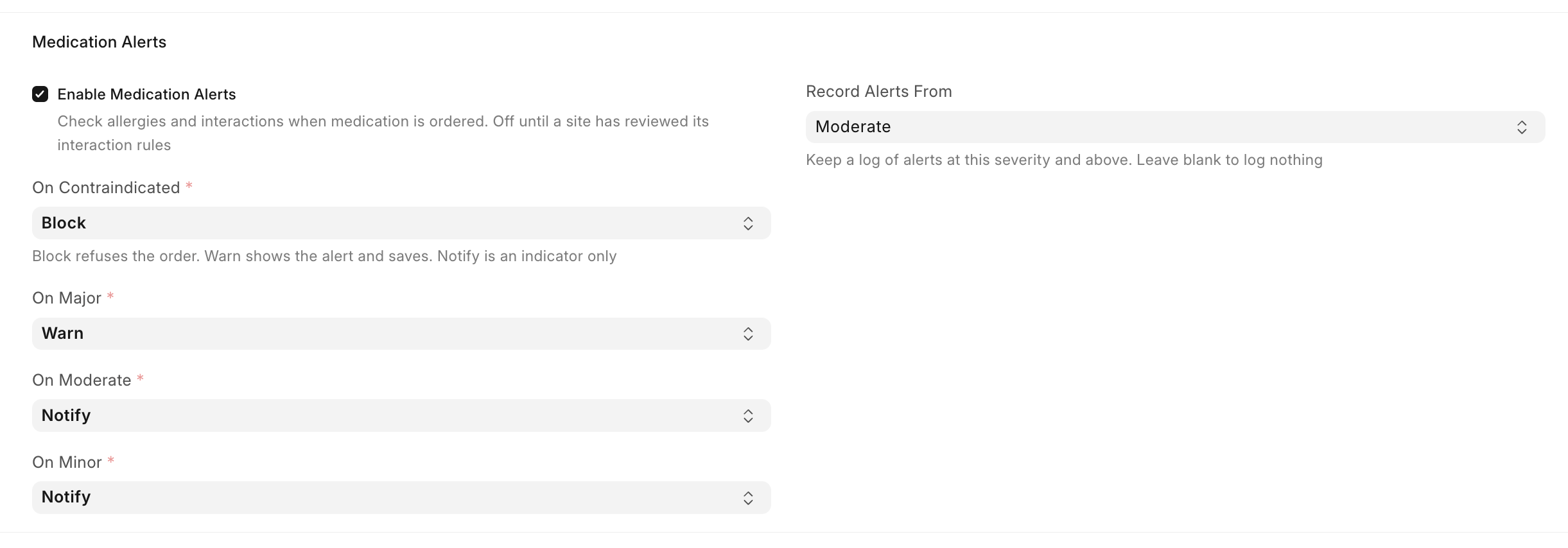
- Enable Medication Alerts: Switches the whole feature on. While it is off, no allergy or interaction is checked and no alert is raised.
- On Contraindicated, On Major, On Moderate, On Minor: What happens when an alert of that severity is raised. See What each severity does.
- Record Alerts From: Keeps a Medication Alert Log entry for alerts at this severity and above. Leave it blank to keep no log.
A more serious severity can never act more weakly than a milder one. If you set On Minor to Block, the two above it must also block.
What each severity does
Each severity is assigned one of three actions.
| Action | What the prescriber sees | Default for |
|---|---|---|
| Block | The order is refused and cannot be saved | Contraindicated |
| Warn | The alert is shown and the order is saved | Major |
| Notify | An indicator appears as the medication is selected | Moderate, Minor |
Any severity can be set to any action, so a site that wants a minor interaction to stop the order can configure that.
Recording an allergy
Allergies are recorded in two parts: the allergen, and the patient who reacts to it.
Allergy
An Allergy names the allergen and, for medications, what a prescription is checked against.
- Allergy Name: The allergen as a clinician would name it, for example Penicillin, Peanut, Latex
- Category: Medication, Food, Environment or Biologic
- Substance Type and Substance: For a medication allergen, the Medication or Medication Class the allergen refers to. Point at a Medication Class to cover every medication in that class and every class under it.
- Medical Codes: Codes from the standards configured on your site
A food, environment or biologic allergen carries no substance and is never checked against a prescription.
Patient Allergy
A Patient Allergy records that a patient reacts to an allergen.
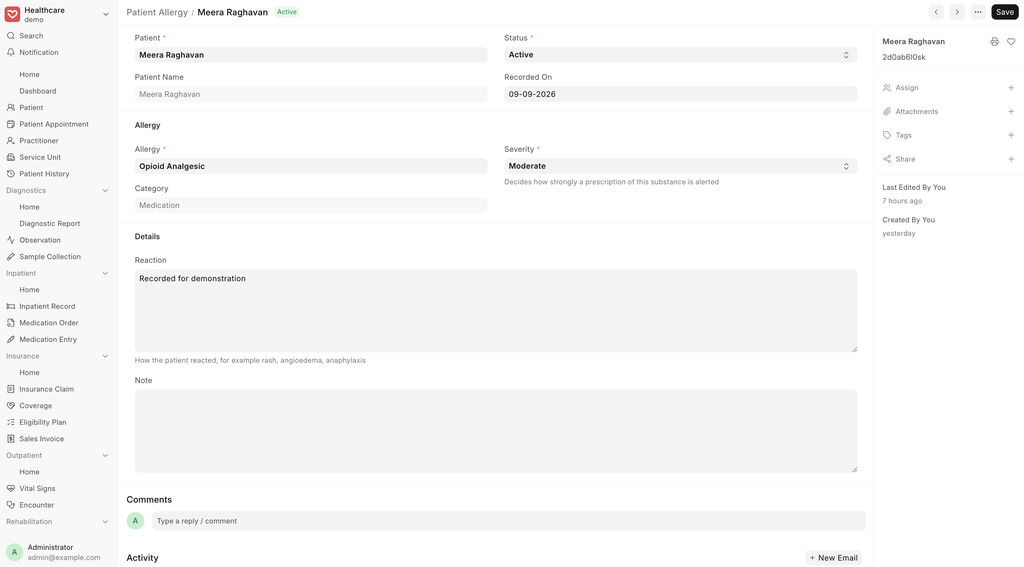
- Patient and Allergy: Who reacts, and to what
- Severity: Mild, Moderate or Severe. This decides how strongly the alert is raised.
- Status: Only Active allergies raise alerts
- Reaction: How the patient reacted, for example rash, angioedema, anaphylaxis
Allergy severity maps onto the alert severities, so the actions you configured govern allergies as well as interactions.
| Allergy severity | Alert severity | Default action |
|---|---|---|
| Severe | Contraindicated | Block |
| Major | Major | Warn |
| Moderate | Moderate | Notify |
| Mild | Minor | Notify |
Recording an interaction
A Medication Interaction is a rule between two interactants.
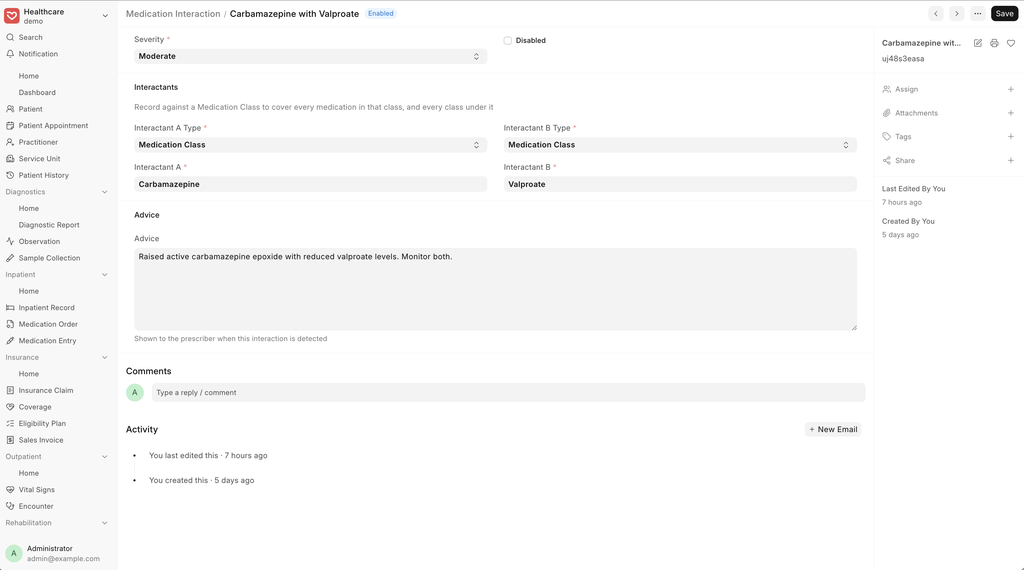
- Interactant A and Interactant B: A Medication or a Medication Class on each side
- Severity: Contraindicated, Major or Minor
- Advice: Shown to the prescriber when the interaction is detected
- Disabled: Stops the rule being applied without deleting it
A rule is stored once and matched in both directions, so there is no need to enter it twice.
Marley Health does not ship interaction content. The rules are yours to author and maintain, and should be reviewed by a pharmacist before a site relies on them.
How a medication is matched
A rule rarely names the exact product being prescribed. When a medication is checked, Marley Health expands it into everything a rule could name: the medication itself, the medications a combination is made of, and every class above them.
Analgesics and Anti-inflammatory Agents
└─ Non-Steroidal Anti-Inflammatory Drugs        <- a rule written against this class
   └─ Propionic Acid Derivatives
      └─ Ibuprofen
         └─ Ibuprofen 400mg Tablet              <- reaches this prescription
So a rule written against NSAIDs reaches Ibuprofen 400mg through Propionic Acid Derivatives, and an allergy to Penicillins reaches Amoxicillin 500mg. A combination product is matched on each of its ingredients, so an allergy to clavulanic acid is caught when co-amoxiclav is prescribed.
What happens when an order is placed
Alerts are raised in Patient Encounter and Medication Request.
- Selecting a medication shows an indicator for anything already recorded against it
- The drug search marks medications the patient has an allergy to
- Saving the order raises the alerts, and a blocked order is refused
Every medication on the order is checked against the others, and against the medications the patient is already on through their active Medication Requests.
Medication Alert Log
Where Record Alerts From is set, each alert raised is kept as a Medication Alert Log entry: the patient, the two medications, the severity and action, the rule that fired, and the order it was raised on.
The log cannot be edited or deleted by anyone, so it stands as a record of what a prescriber was shown.
Medication classes
Alerts rely on Medication Class being organised as a tree, so a rule written against a broad class reaches the products beneath it. Marley Health seeds a standard tree of therapeutic groups down to ingredient level, along with a list of common allergens.
Medications must be classified into that tree for rules to reach them. A medication carrying a class of its own from before the tree existed still works, but only rules written against that exact class will match it.